Private Cheats for Delta Force for PC (Hacks)
Here you can buy a working hack for the game Delta Force
List of Cheats for Delta Force
Delta Force: Hawk Ops is a large-scale online shooter with a tactical edge, designed for those who value realistic combat, teamwork, and dynamic battles. The game combines elements of classic shooters with modern mechanics, featuring battles across large maps with dozens of players, vehicles, and well-crafted modes. Many compare Delta Force to hits like Battlefield, Escape from Tarkov, Warzone, and Arena Breakout, but it has its own distinct character: it’s a more “tactical” game where you must account not only for shooting accuracy but also positioning, proper squad coordination, and resource management. It’s this balance between realism and dynamism that has earned Delta Force its popularity among military shooter fans. Today, the project is available on PC through popular clients, and its audience continues to grow, as every session here becomes a true tactical challenge. However, newcomers often struggle: experienced players quickly secure key positions, vehicles and drones are used with maximum efficiency, and the time required for character progression can stretch into dozens of hours.
That’s why more and more players are turning to private cheats for Delta Force. They help remove unnecessary limitations, speed up progression, improve shooting accuracy, and maintain real-time situational awareness. With reliable software, you can not only play “on equal footing” with veterans but confidently dominate the battlefield.
If you're interested in cheats for Delta Force: Hawk Ops, you might also be interested in "Cheats for Escape From Tarkov", "Cheats for Arena Breakout", "Cheats for Battlefield", "Cheats for Hunt 1896".
The main advantage of private solutions lies in the balance between functionality and security. Such programs are developed with a focus on staying undetected, making the risk of a ban minimal. Moreover, the extensive range of features allows you to tailor the cheats to different game modes, from large-scale Havoc Warfare battles to tense Hazard Operations missions.
Ultimately, private cheats in Delta Force are not just a crutch for beginners but a tool that allows you to compete with strong opponents on equal terms and enjoy every session.
Delta Force Aimbot (Silent & Legit)
The aimbot is one of the most sought-after features of private software for Delta Force, as shooting and accuracy are what decide the outcome of battles. Even a minor miss can cost your squad its life or cause an entire operation to fail. With an aimbot, players gain perfect control over targeting, with highly flexible configuration options — from aggressive auto-targeting to smooth, almost imperceptible aiming movements.
Aimbot Features:
- Enable — turns the feature on or off with a single click.
- Visible Only — the aimbot only locks onto targets in direct line of sight, making gameplay more “legit.”
- Ignore Knocked — disables aiming at downed enemies, preventing wasted time on finishing them off.
- FOV — adjusts the aimbot’s field of view, letting you choose how widely it “acquires” targets.
- Draw FOV — displays the aimbot’s working area on-screen for easy configuration.
- Target Line — draws a line to the current target, offering better control over the feature’s function.
- Max Distance — limits the range so the aimbot only responds to enemies within a certain distance.
- Aim Key — select a convenient key to activate the aimbot (e.g., hold right mouse button or any other key).
- Controller Mode — provides gamepad support, especially convenient for players accustomed to console-style controls.
- Aim Filter (Distance / Crosshair / Lowest HP) — sets target selection priority: closest enemies, those nearest to the crosshair, or those with the lowest health.
- Bone — choose the body part to aim for: head, body, or limbs.
- Head Chance — set the percentage chance of aiming for the head — perfect for legit gameplay.
- Smooth — smooths the aimbot’s movements, making the aiming appear more natural.
- Speed — adjusts the crosshair movement speed.
- Stickness — configures how strongly the aimbot “sticks” to the target, helping keep the opponent in the crosshairs while moving.
Examples of Aimbot Use in Delta Force:
- In Havoc Warfare mode, where dozens of players battle simultaneously, the aimbot helps maintain effectiveness during prolonged firefights, preserving accuracy even amidst chaotic enemy movements.
- In Hazard Operations, when you need to extract under enemy pressure, you can prioritize close-range targets for quick, reactive shooting while on the move.
- For snipers, the aimbot with range limitations and smooth aiming allows for a natural playstyle while guaranteeing hits.
- Players using assault rifles can set Head Chance to 20–30% to land occasional headshots without arousing suspicion.
- In close-quarters engagements, enabling a limited FOV and high aiming speed helps react quickly to enemies appearing around corners.
Delta Force Wallhack (ESP)
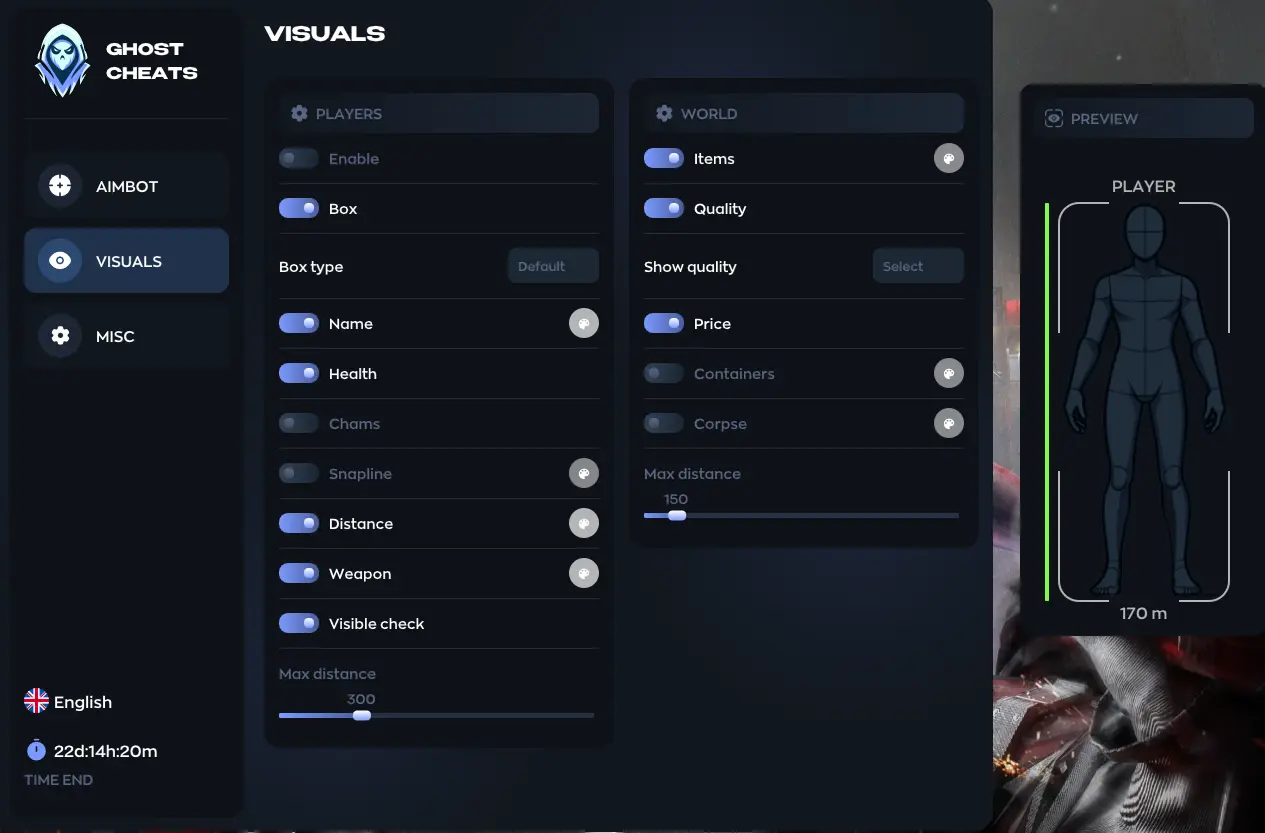
ESP, or Wallhack, is an indispensable feature for players who want to stay one step ahead. In Delta Force, knowing the location of enemies, vehicles, and teammates is crucial, given the large maps and battles occurring simultaneously in multiple directions. ESP provides the ability to see enemies and objects through walls and obstacles, along with other critical information unavailable to regular players.
ESP Features:
- Players ESP — displays all players on the map.
- Bots ESP — highlights bots, making PvE encounters easier to navigate.
- Boxes (2D, 3D) — outlines enemies with boxes for easy tracking.
- Snaplines — draws lines from your character to enemies, allowing for instant location identification.
- Visible Check — uses different colors for enemies behind walls versus those in direct sight.
- Distance — shows the distance to the enemy.
- Max Distance — limits the effective range of the Wallhack.
- Name — displays player names and bot identifiers.
- Team Number — shows team IDs for quick orientation.
- Weapon Type — indicates what weapon the enemy is holding.
- View Info — shows the direction the target is facing.
- Health Bar — displays a health indicator for each enemy.
- Head Circle — highlights the head area for easier targeting.
- Line Thickness — adjusts the thickness of lines for all ESP elements.
Examples of ESP Use in Delta Force:
- In Havoc Warfare, ESP helps maintain control over entire sectors of the map by always revealing incoming threats.
- In Hazard Operations, knowing enemy and vehicle locations is critical — ESP helps avoid ambushes during extraction.
- For snipers, using Visible Check prevents wasting time on enemies not visible due to cover.
- In close combat, Snaplines and Health Bars are useful for instantly identifying weakened enemies to prioritize.
- When playing in a squad, ESP showing weapons and health aids in making strategic decisions: attack, retreat, or flank.

Delta Force Chams WH
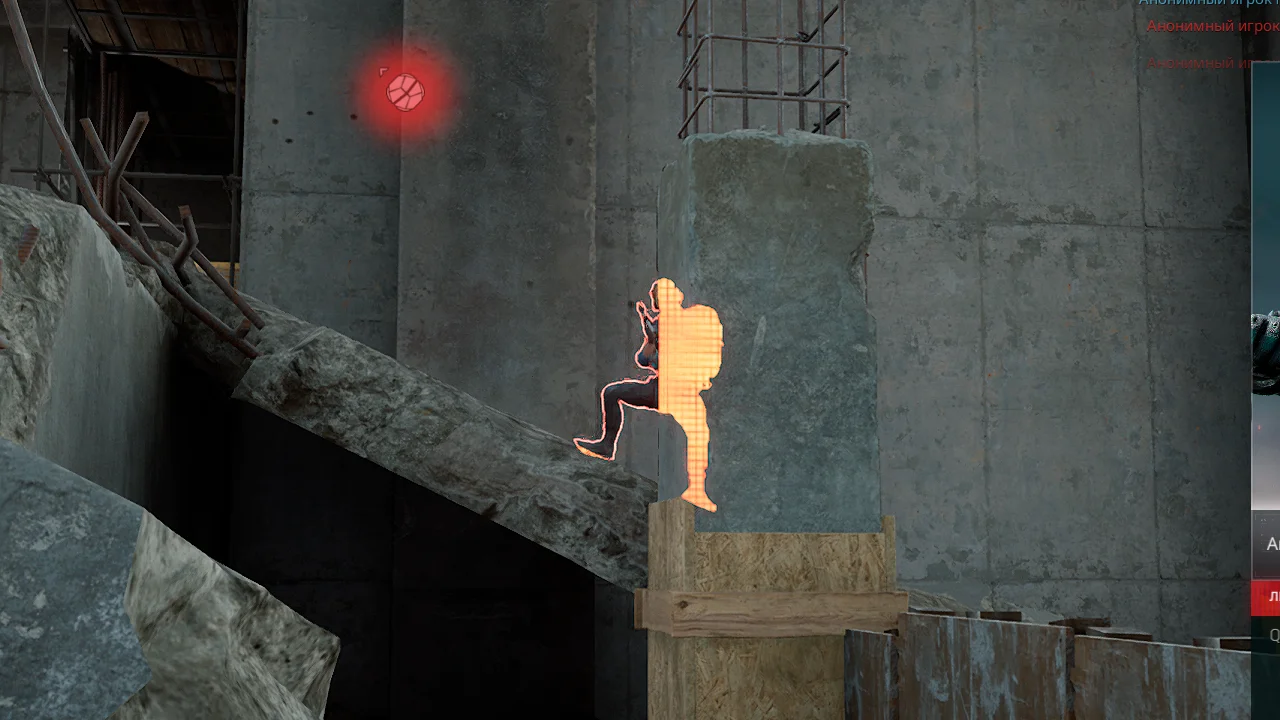
Chams are a type of Wallhack that highlights enemies and vehicles with bright colors, visible through any obstacle. Unlike classic ESP, which displays enemies as boxes, lines, or health bars, Chams makes player and object models stand out clearly, regardless of their position on the map. This provides the player with instant information about opponent locations, enabling quick reactions to any threat.
Key Chams Features:
- Player Chams – highlights all players on the server, even behind walls or cover.
- Vehicle Chams – highlights vehicles: armored cars, helicopters, cars. This is especially useful in modes featuring heavy vehicles, where knowing an enemy's approach is critical.
- Visible Check – allows setting different colors for enemies in direct line of sight versus those hidden behind obstacles.
- Flexible color customization – allows choosing shades that are comfortable on the eyes and won't blend into the map's background.
Examples of Chams Usage In-Game:
- During urban combat, an enemy might hide behind a wall or inside a building window — Chams will highlight their model, allowing you to prepare an advantageous position for an attack.
- In night missions or on dark maps where visibility is severely limited, bright enemy highlighting provides a massive advantage, giving you full view of the battlefield.
- In Havoc Warfare mode, Chams helps quickly locate enemy vehicles and prevent ambushes.
- When defending a point, Chams makes it easy to track the direction enemies are preparing to attack from, even if they are approaching using terrain or cover.
Chams for Delta Force is not just a convenient feature, but a powerful tool that makes the battlefield completely transparent. The player gains confidence in every move and eliminates the element of surprise, which is especially valuable in intense PvP engagements.
Delta Force Loot ESP
In Delta Force, equipment is paramount: the right weapon, armor, or rare items can turn the tide of a battle. However, searching for specific loot on large maps can take too much time. This is where Loot ESP comes in — a feature that makes all items visible, even from a distance or hidden inside buildings.
Loot ESP Features:
- Loot ESP — enables/disables item highlighting.
- Name — displays item names for quick identification.
- Distance — shows the distance to the loot in meters, helping decide if it's worth retrieving.
- Max Distance — sets the maximum range for displaying items.
- Price — shows the item's value, particularly useful in the mode's economy.
- Quality — sorts items by quality to quickly find rare and useful ones.
- Dot — displays minimalist dots near objects to avoid cluttering the screen.
Examples of Loot ESP Use in Delta Force:
- In Hazard Operations mode, Loot ESP helps instantly find rare gear necessary for a successful extraction.
- In team play, roles can be assigned beforehand: one player goes for weapons, another for medical supplies.
- During active firefights, Loot ESP reveals where medkits and armor are located, potentially saving a life in a critical moment.
- Players focused on economically valuable loot use price and quality filters to avoid wasting time on useless items.
- For snipers, Loot ESP is particularly useful for finding needed ammunition and scopes without searching every building.
Secure Delta Force Radar (Map Hack)
On the expansive maps of Delta Force, situational awareness is crucial. Even the most experienced players can lose track amidst vehicles, allies, and enemies. Under such conditions, a radar becomes an indispensable tool, displaying a compact window on-screen with information about enemy, ally, and vehicle movements.
Radar Features:
- Radar — turns the radar on/off.
- Radar Size — adjusts the radar window size for convenient use.
- Displays players and vehicles — provides instant understanding of enemy, bot, or transport locations.
- Interface Flexibility — the radar can be moved around the screen and adapted to your playstyle.
Advantages of Using Radar in Delta Force:
- Tactical Advantage — the player always knows which direction an attack might come from.
- Team Coordination — the radar helps coordinate squad actions, especially in dynamic modes.
- Territory Control — holding key positions is easier when you can see enemy movements.
- Beginner-Friendly — even players unfamiliar with large maps feel more confident.
- Balanced Gameplay — unlike ESP, the radar is less conspicuous and suitable for those who prefer a more legit approach.
Examples of Radar Usage:
- In Havoc Warfare mode, players can track flanking attacks and quickly reorganize their defense.
- In extraction-based operations (Hazard Operations), the radar helps avoid ambushes while moving to the extraction point.
- During large-scale vehicle battles, the radar shows enemy transport movements, allowing for timely evasion or ambush setup.
- For snipers — this is a way to keep the entire map in view without leaving the scope.
Working Delta Force Spoofer
In any online game, the risk of an account or hardware ban always exists. Even the most reliable private cheats can, in rare cases, be caught by anti-cheat, especially if used too aggressively. To protect against such unpleasant consequences, an additional tool exists for Delta Force: the HWID Spoofer.
If you are looking for working HWID Spoofers, visit this section: Spoofers.
What Does a Spoofer Do?
- Modifies Unique Device Identifiers – the spoofer changes the “digital fingerprint” of your PC (HWID) that anti-cheats use for identification.
- Complete Anonymity – after a system restart, your old data is wiped, and the anti-cheat sees your computer as a new device.
- Bypasses Bans – even if you have already received a hardware ban (HWID Ban), the spoofer allows you to return to the game immediately.
- Compatibility with Delta Force Clients – works with the latest game versions on major platforms.
Examples of Spoofer Usage:
- A player using private software wants absolute assurance that their PC won't receive a permanent ban — the spoofer acts as a “safety net.”
- After an unsuccessful experiment with public cheats, a user faced an account and hardware ban. The spoofer allows them to play again without buying a new computer.
- Those who play Delta Force across multiple accounts use a spoofer to change the system's digital fingerprint each time, reducing the risk of account linkage.
Conclusion:
HWID Spoofer is an essential security component for any player using private cheats in Delta Force. It eliminates all risks associated with hardware bans and allows you to play without fear of losing access to your favorite game.
Undetected Delta Force Mod Menu
In the context of software development and the gaming industry, the term “mod menu” refers to a specialized auxiliary application integrated into the client-side of a video game. The primary functional purpose of this software is to provide the user with a graphical user interface (GUI) for managing modified or unauthorized game parameters.
Unlike standard user modifications, a mod menu is generally focused on altering the internal logic of the gameplay in real-time. Typical functionality of such solutions includes: modification of game resources (e.g., infinite health, ammunition, or in-game currency), altering the physical parameters of the game world (character movement speed, gravity), and disabling limitations imposed by the developers, such as weapon recoil or level timers.
From an architectural standpoint, such solutions can be implemented either as external applications interacting with the game process via code injection, or as loadable modules that extend the basic functionality of the game.
Delta Force Cheats for Operations and Havoc Warfare (Battlefield)
The “Operations” mode in Delta Force demands caution, precision, and effective team coordination: there are no massive battlefields here; instead, action unfolds in confined spaces where every second counts. In contrast, Havoc Warfare mode offers large-scale battles reminiscent of classic Battlefield, where dozens of players clash on huge maps, and success depends on quickly orienting and securing key positions.
Cheats for Havoc Warfare (Battlefield) Mode in Delta Force
Havoc Warfare mode is all about large-scale battles, reminiscent of classic Battlefield. Dozens of players converge on huge maps, where success depends on quick orientation and securing key positions.
With private cheats, these battles become far more manageable: ESP allows you to see enemies before they occupy advantageous spots, the aimbot assists in firefights at any range, and the radar provides a comprehensive view of the battlefield.
Application Examples:
- Tracking enemy vehicles using Vehicle ESP and Chams.
- Confident long-range engagements thanks to a smooth aimbot.
- Monitoring attacking squads while your team holds a strategic point.
📌 This set of capabilities gives the player a significant advantage, transforming chaotic Havoc Warfare battles into a precise and predictable process.
Cheats for Operations Mode in Delta Force
The “Operations” mode in Delta Force demands caution, precision, and effective team coordination from players. There are no massive battlefields here — instead, players operate in confined spaces where every second counts.
Using private cheats makes these missions more predictable: the aimbot helps neutralize an enemy before they can raise an alarm, ESP reveals the true picture of enemy and resource locations, and the radar allows you to maintain situational awareness even in enclosed areas.
Application Examples:
- Timely identification of ambushes along the extraction route.
- Precise building clearance without unnecessary casualties.
- Searching for useful gear to prepare for the final phase of an operation.
📌 As a result, private software turns tactical missions into a controlled process where team success depends solely on their strategy.
Delta Force Cheats for Computer (PC)
Playing Delta Force on PC means gaining access to all the game's technical capabilities while using software at its full potential. Private cheats for computers are more stable, offer more flexible settings, and are better optimized for modern configurations. This is especially important for those who want to play with maximum performance without lags or crashes.
The main advantage of using cheats on PC is that the player gains complete control over every tool: from precise aimbot configuration (with bone selection, speed, and smoothness) to detailed ESP customization, enabling or disabling the display of players, bots, vehicles, and even map items.
Why PC Software is Considered Superior:
- Customizable to your needs: hotkeys, interface, element placement.
- Support for all major game clients (Steam, Epic Games, and others).
- High performance and absence of critical lag when using the software.
- Faster updates and fixes following game patches.
Thus, Delta Force cheats for PC are the optimal solution for those who want to play both effectively and safely.
PC Game Clients
Delta Force is a modern title available on several gaming platforms for PC. This is important to consider, as the choice of client can affect whether selected private software will work. The developers release the game on major digital stores to reach a broad audience, while cheat developers, in turn, adapt their products for these versions.
Which Clients is Delta Force Available On:
- Steam — the most popular client, home to the majority of the player base.
- Epic Games Store — an alternative platform offering the game with regular updates.
- Delta Force Client — the official client from the game's website.
- Garena - the game client for Southeast Asia.
- WeGame - the version of the game for users in China.
Most private cheats from the Wh-Satano store are fully compatible with these clients. This means that regardless of where you acquired Delta Force, you will be able to use the software without restrictions.
Conclusion:
Players need not worry about compatibility — cheats for Delta Force are developed with different clients in mind. Up-to-date versions work reliably and are updated after each game patch, ensuring the user always stays one step ahead.
Best Delta Force Cheats – Wh-Satano
When it comes to choosing private software, it's important not only what features it offers but also how reliable the source is. The Wh-Satano store has specialized in selling private cheats for the most popular online games, including Delta Force, for many years, earning the trust of thousands of players during that time.
Why Choose Wh-Satano:
- Experience and Trust — we have been operating since 2015 and have a vast base of returning clients.
- Complete Security — all cheats are tested for viruses and malicious elements.
- Undetected Status — the software is maximally hidden from anti-cheat and updated with every game patch.
- 24/7 Support — our team is always available to help resolve any issues.
- Competitive Prices — an optimal price-to-quality ratio without unnecessary markups.
- Convenient Payment — support for international and local payment systems.
- Transparency — each product includes a detailed description and installation guide.
By purchasing Delta Force cheats from the Wh-Satano store, you get more than just access to functionality; you receive a full-fledged service where your security and convenience are taken care of at every stage.
How to Buy a Delta Force Hawk Ops Cheat in 2026?
The process is actually as simple as possible, and even a beginner can handle it. Just follow the step-by-step instructions we’ve prepared for you.
Step-by-Step Cheat Purchase Instructions
- Go to the Wh-Satano website.
- Open the Delta Force cheats section and browse the selection.
- Choose the desired product and go to its page.
- Carefully read the description, feature list, and launch requirements.
- If a subscription choice is available, select the optimal duration (day/week/month).
- Click the “Buy” button.
- Select a convenient payment method and complete the transaction, following the payment system's prompts.
- After successful payment, access to the download and instructions will be automatically available in your personal account.
- Download the installer, follow the instructions to install and activate.
- Launch Delta Force and enjoy the benefits of private software from Wh-Satano.
As you can see, there is nothing complicated about buying a cheat. Just follow the step-by-step instructions, and within minutes, you'll be able to utilize all the features of the private software. With the Wh-Satano store, the purchase process is always fast, safe, and convenient.
Delta Force remains one of the most interesting projects in the tactical shooter genre, offering players thrilling battles across different modes and ample opportunities for team play. But with rising competition comes increased match difficulty: opponents become more skilled, and the demands on reaction time and attentiveness grow. This is where private cheats open new horizons, allowing you to play more confidently, enjoy every battle, and achieve maximum results.
By using tools like aimbot, ESP, radar, and other advanced features, you gain a serious advantage over opponents while maintaining a natural playstyle and control over the process. Additional solutions like the HWID spoofer ensure security and stability, while support for different game modes makes the software versatile.
When you purchase private cheats from the Wh-Satano store, you choose quality, reliability, and genuine support. These are not just tools for playing, but a complete service that helps unlock your potential in Delta Force and enjoy victory without unnecessary restrictions.
Frequently asked questions about cheats for Delta Force
Delta Force uses the anti-cheat ACE (Anti Cheat Expert) from Tencent. This is a modern security system that works at a deep system level and monitors cheats, injectors and suspicious behavior in real time. Anti-cheat analyzes not only the game itself, but also the environment of your system, as well as the player's behavior, so protection is considered quite tough. That is why it is worth choosing private cheats from experienced and renowned developers.
In some cheats for Delta Force, antiscreen or StreamProof is actually implemented in another way. It is needed to protect against automatic and manual screenshots that can be taken by an anti-cheat or a reporting system. Anti-screen usually hides the visual elements of the cheat in screenshots or temporarily disables them. However, its availability depends on the specific cheat and the version of the anti-cheat. StreamProof works on a deeper level. It blocks cheat elements and its menus in screenshots, video recordings, and streams.
Yes, some of the Delta Force aimbots support the game from the gamepad. This is relevant for players who use the controller on a PC. These aimbots take into account the features of the sticks and work softer to make the movements look natural. Not all cheats have gamepad support, so you need to check it separately.
Not all cheats for Delta Force are universal across clients. Some work only with the Steam version of the game, while others work with the official launcher or WeGame. This is due to differences in protection, game files, and the launch method. Before buying a cheat, it is important to make sure that it supports exactly the Delta Force client that is being used.
Recent reviews of our cheats for Delta Force

xss.b1nq
Thanks for this software, it's simply perfect for legitimate gaming, everything is perfect. I'm happy, this is my second purchase.
Esper
100% legit hack. It's not very complicated and easy to use. Sometimes the hack doesn't work , when this happens u just need to use luna ult😁
Esper
Very good hack, It doesn't make you pro, but it will give you enough visual. The rest it up to you skills and gear. The best thing about this hack is it's easy to use and it doesn't put much load on pc (tip: in my case sometimes the hack doesn't start in the starting of the match, wait for luna ult and use it on bot, the esp will work again).
FR3AKY1337
Everything's fine, but two things are annoying and hinder use:
- Injection delay, you're running around the map for 10 minutes without a WH;
- WH lags (Rip ESP).
Mana
I bought this cheat, I've been using it for 3 days now, it works great, before buying I consulted with Miron, he explained everything how it works and what to do, great guy, thanks to him!
NightRick
Firstly, it's easy to use, because it's pure ESP and has no menus. It starts right away, which you can tell by Luna's ultimate. Secondly, its main drawback, which I had, was that it often took a long time to load, up to 5 minutes. After 5 minutes, I didn't notice any difference from a regular game, even though I took it for a week to try it out. It probably would have been better to take it for a day...
Fr13nds
Phoenix, my darkness. Phoenix, my life. Phoenix, my joy. Phoenix, my sorrow. Phoenix, my rest. Phoenix, my soul. Phoenix, me.
Centurion
I wasn't expecting anything out of the ordinary, but I was pleased with this software; I've used two others. It has some drawbacks (it doesn't show the armor tier on the operator), but compared to other features, it's nothing. I recommend it for purchase.
ZexRox
Firstly, this is only player esp, know that and the description will say cheat menu there aint any, if the cheat successful booted up. You can go inside a game and see the cheat works well , in operation the esp is kinds like the luna arrow sometimes hards to see lol , but as a esp its good.
ZexRox
Well, for starters cheat works well, the aim both pretty good , and the player esp too, but on the downside aim will try to shoot through walls and loot esp is not working at all. Other than the cheat works without a sweat. Know that your playing is what affecting the acc getting banned first of course you will reserve one day ban your fine with it after it admin will monitor you play safe (in operation nothing happened to me in warfare).
Mate
I've been using this cheat for about a month now, and unlike other cheats, I haven't experienced any freezing issues. It's amazing!
Berkin
I've been using this software for a long time, and they always provide excellent support whenever I encounter any problems. First and foremost, I want to thank Miron and all the developers for creating such a wonderful product!
Châu
works really well, i got some errors but the support team helped me fix them, great!
Odlee
I've used a lot of cheating software before, but I've never seen one as good as yours. I'm so satisfied that I've been using it about for two months and haven't had a single account ban. I highly recommend it. I'd like to thank the customer service representatives
CkOwS
Guys, the software is excellent, both in Rage and Legit, once you set it up, it's great. If you have any issues with the software, launching it, or encountering errors, please contact Miron's support team; he'll be happy to help you resolve the issue quickly and efficiently.
GOST
The cheat is good, WH and AIM are convenient, and I didn't get banned after four days of playing. But on the fourth day, the game started crashing while playing with the cheat. I'm waiting for a fix.